

Mozzart withdraw and deposit
| What You'll Find Inside | Topic |
|---|---|
| 🔍 Your complete and honest Mozzart guide. | Mozzart Review |
| ✍️ Follow our easy step-by-step signup. | Mozzart Registration |
| 💰 Learn how to win massive jackpots. | Mozzart Jackpot Guide |
| ✈️ Master the exciting Mozzart Aviator game. | Mozzart Aviator Game |
| 📲 Download the powerful Android betting app. | Mozzart Android App |
| 🍏 Get the sleek app for your iPhone. | Mozzart iOS App |
How do I create an account on Mozzart?
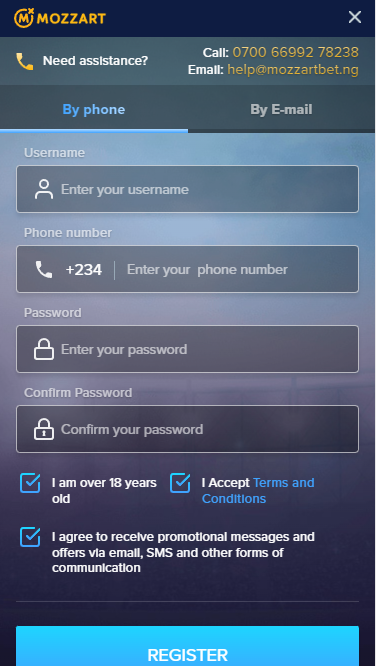
Registartion by phone
- Your user name, which may not coincide with your real name in your passport (please note that the name must include from 6 to 15 characters, as well as the use of numbers or special characters "." and "_").
- A valid phone number that you can confirm and complete your registration.
- Password (please note that the combination used must include at least 8 characters, including at least one capital letter, a special character (@ $ ! ! % * # ? &), a lowercase letter or a number).
- Re-enter the password for security.
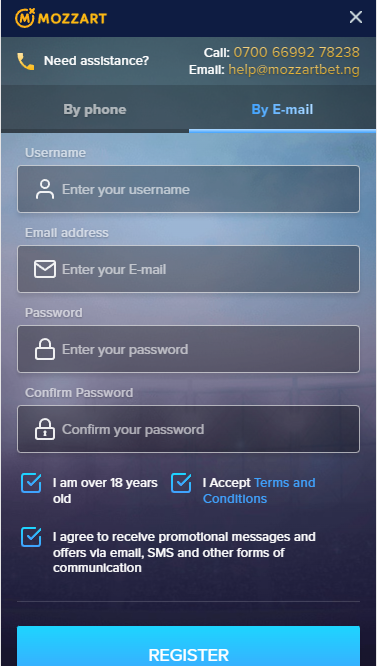
Registartion by E-mail
Features of payment at the bookmaker Mozzart
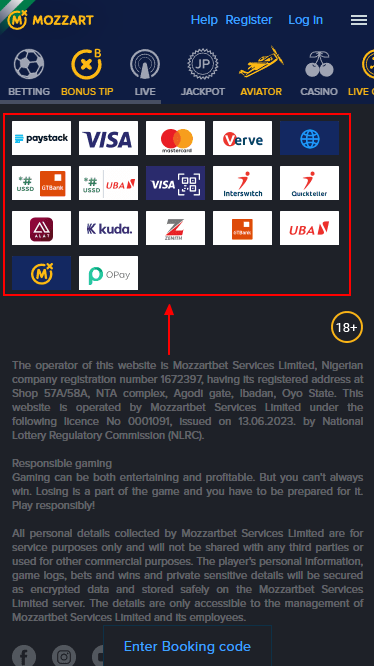
- Debit/credit cards (Visa, MasterCard, Verve).
- Bank deposits (Alat, Zenith, Kuda, GTBank, UBA).
- USSD (USSD GTBank, USSD UBA).
- Online payment systems (Paystack, Quickteller, Interswitch, Opay).
- Others (Mozzart betting shop).
- QR (Visa QR).
| What You'll Find Inside | Ratings |
|---|---|
| 💳 Bet with Mastercard easily. | Mastercard Betting Sites |
| 💸 Secure PayPal-friendly bookmakers. | PayPal Betting Sites |
| 💲 Best Paystack betting platforms. | Paystack Betting Sites |
| 📲 Bet using OPay with ease. | OPay Betting Sites |
| 🎟️ Trusted Paysafecard bookmakers. | Paysafecard Betting Sites |
| 🧾 Top credit card betting sites. | Credit Card Betting Sites |
| 📞 USSD-powered betting platforms. | USSD Betting Sites |
| 🟦 Maestro card-friendly bookmakers. | Maestro Betting Sites |
| 📱 PalmPay-supported betting sites. | PalmPay Betting Sites |
| 🔁 CoralPay betting sites. | CoralPay Betting Sites |
| 💼 Neteller-friendly bookmakers. | Neteller Betting Sites |
| 💳 Skrill-compatible platforms. | Skrill Betting Sites |
| 👛 Best eWallet betting options. | eWallet Betting Sites |
How can I make a deposit on Mozzart?
| What You'll Find Inside | Topic |
|---|---|
| 🎁 Maximize your very first deposit bonus. | Mozzart Welcome Bonus |
| 🔑 Unlock exclusive rewards with a code. | Mozzart Promo Code |
| 🎰 Discover exciting casino spins and offers. | Mozzart Casino Bonuses |
Deposit to Mozzart account using Quickteller
- Authorize or register with Mozzart, then go to the deposit section.
- Familiarize yourself with the available payment methods and select the Quickteller operator.
- Once the system redirects you to a new page belonging to the site of the selected company, fill in the form presented on the screen with all the requested information.
- Enter your user ID and in the next cell specify the amount you want to see in your Mozzart account.
- Select "eCash" as your payment option.
- Spell out your Quickteller account details.
- If you are ready to complete the transaction, then click on the "Pay" button.
Top up Mozzart account using USSD
- Go to the deposit section.
- Select USSD as a deposit option and specify the amount you want to transfer to the game account.
- Wait until the bookmaker redirects you to the page to choose the bank in which you have an account.
- As soon as you decide on the choice, the system will provide you with a special code, which you will need to type in a separate field to safely complete the operation.
Withdrawal of Mozzart winnings
- Go to your personal cabinet.
- Find the "Betting on account" key. It can also be placed in the menu right on the main page.
- In the list of possible options, find the button responsible for withdrawing money.
- If you are withdrawing money for the first time, you will need to confirm your account by entering such data as date of birth, current residential address and e-mail.
Frequently Asked Questions
First of all, make sure that you are logged into your account and you have access to conduct financial transactions. Then, on the top menu bar, find the "Deposits" button and click on it to go to the section responsible for depositing your game balance.
Unfortunately, the company's payment system does not provide services of this operator.
To find out the details of previous contributions and withdrawals, go to the Player's Personal Area and then click on "Transactions" or "Transaction History". Then mark the date to view all transactions that were made on that day.
At the time of writing, online platform Mozzart not only offers the opportunity to take part in this crash game, but also to apply the corresponding bonus that guarantees a free bet prize. So, if you are interested in Aviator on the bookmaker's website, we advise you to read this article.